
Your business data, backed up and out of reach.
Hard drives fail, laptops get stolen, and ransomware encrypts everything it can reach — including the backup sitting on the same network. DISK.PK keeps a second copy of your files and databases somewhere that trouble cannot follow.
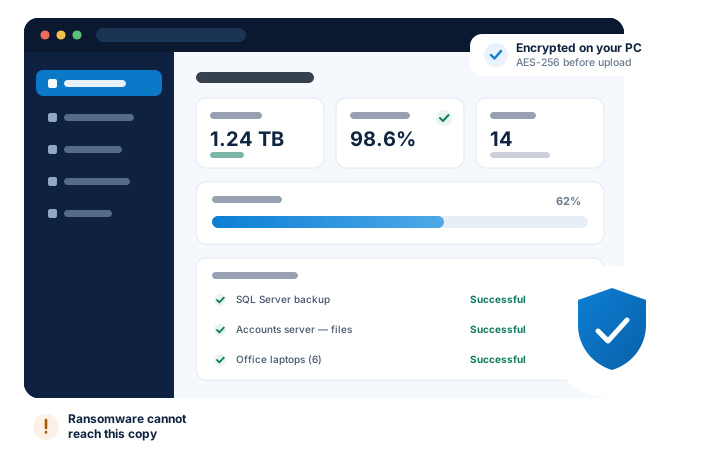
An illustration of the console. Figures shown are an example, not a customer's.
Most businesses find out too late
Nearly every company we speak to believes it has a backup. The trouble is what that backup usually turns out to be.
A copy in the same building
An external drive next to the server does not survive fire, theft, flooding or a power surge. It is a spare copy, not a backup.
A copy ransomware can reach
If a mapped drive or network share holds your backup, ransomware encrypts it along with everything else. Most businesses discover this on the day it happens.
A copy nobody has restored
An untested backup is a guess. A backup is worth exactly what its last successful restore proved — which is why we test restores instead of assuming.
Five services, one job: getting your data back
Pick the piece you need, or let us look at the whole picture with you.
Cloud Backup
Automatic, scheduled backup for servers, PCs and laptops.
Read moreCloud Storage
Secure online storage your team can reach from anywhere.
Read moreSQL Server Backup
Live database backup without stopping your application.
Read moreRansomware Protection
Copies attackers cannot quietly encrypt or delete.
Read moreDisaster Recovery
A tested plan for getting back to work quickly.
Read moreNot sure which you need?
Tell us what you have and what you would hate to lose. We will tell you what protecting it involves.
Ask usStraightforward pricing
Every plan includes restores, help with setup, and a tested restore. Nothing is charged twice.
Starter
One machine, off-site, every night.
No setup fee.
- Storage100 GB
- History kept30 days
- Devices2
Business
A small office, including the database.
No setup fee.
- Storage500 GB
- History kept90 days
- Devices10
- SQL backupIncluded
Professional
Several servers, longer history, faster help.
No setup fee.
- Storage2,000 GB
- History kept365 days
- Devices25
- SQL backupIncluded
Team Storage
Shared files your team can reach from anywhere.
No setup fee.
- Storage1,000 GB
Protected within a day of saying yes
No jargon, no six-month project, no consultant living in your office.
We look at what you have
Which machines, how much data, which databases, and how much work you would lose if it all disappeared today.
We install and schedule
The agent goes on your machines and runs on a schedule that suits your working hours. The first full copy is taken once.
It keeps running quietly
After the first copy only what changed is sent. You get a report, and we watch for jobs that fail.
We prove it restores
We test a restore with you, so you have watched your data come back before you ever need it to.
Why businesses choose a provider in Pakistan
When a restore is urgent you need someone awake. Our hours are Pakistani hours, and you can reach us on WhatsApp.
Pay in PKR by bank transfer, JazzCash or Easypaisa. No card in dollars, no exchange-rate surprise on the invoice.
Your data is encrypted on your machine, travels encrypted and stays encrypted at rest. We cannot read your files.
Backups are kept so that a compromised machine cannot quietly delete or encrypt its own history.
Price depends on how much data you keep and for how long. You get the number before you commit to anything.
Getting data back is not an upsell. If you need a restore, we help you do it — at no extra charge.
Attackers go for the backup first
Modern ransomware waits, looks around, and hunts down your backups before it encrypts anything — because a business that can restore does not pay. That is why a copy on a mapped drive or a NAS with saved credentials so often fails on the one day it mattered.
How we stop that- No path from your machines to the stored copy
- Credentials the workstation never holds
- History that cannot be rewritten
- An alert when changed data suddenly jumps
Pay the way you already pay
Every method below is switched on right now. Nothing appears here until it actually works, so nobody picks a dead end at checkout.
Card and wallet payments happen on the provider's own page — your card details never reach our server.
Common questions
What is the difference between cloud storage and cloud backup?
Cloud storage is where files live and are shared. Cloud backup is a separate copy of them, kept so you can go back to how things were. Anything that deletes a file in storage — a mistake, a bad sync, a compromised account — deletes it everywhere it is synced. Only a backup keeps the older version.
How long does the first backup take?
The first run copies everything, so it depends on how much data you have and how fast your connection uploads. A small office is often finished overnight; a file server with hundreds of gigabytes can take several days. It runs in the background and you keep working. After the first copy only changed data is sent, so later runs are minutes, not days.
Can you read my files?
No. Your data is encrypted on your own machine before it is transmitted, and it stays encrypted while we store it. Our staff do not browse customer data.
Will DISK.PK ever ask me for my password?
Never. Not by email, not on WhatsApp, not on a phone call. We do not store passwords in a readable form, so nobody here can look one up or tell it to you — if you forget yours, we send a one-time link and you set a new one. If somebody contacts you claiming to be DISK.PK and asks for a password, it is not us. Please tell us about it.
Does ransomware not just encrypt the backup too?
That is exactly what it tries to do, and it is why backups on a mapped drive, a network share or a NAS with saved credentials so often fail. Protection comes from keeping the copy somewhere the infected machine cannot authenticate to, and from keeping history so that overwriting today cannot destroy last week.
From the blog
The .bak file on the same server: what it really protects you from
Scheduled SQL Server backups written to the D: drive of the same machine are extremely common in Pakistani offices.…
ReadHow ransomware finds your backups before it encrypts you
Modern attacks go looking for the backup first, because a business that can restore does not pay. Here is the order it…
ReadYour external drive is not a backup
It is a second copy in the same room. Fire, theft, power surges and ransomware do not respect the difference — but they…
ReadTell us what you would hate to lose
Send us a short message about your setup. We will reply with what protecting it actually involves, and what it costs — no obligation.